Web Development
Web development is a wide-ranging area of software development, primarily developing websites and web applications. There are numerous roles in web development across companies of all sizes. This field moves quickly, with new tools and frameworks released weekly. As a result, there is no "right" way to do web development. On YETI, we seek to emulate industry standards. Our stack primarily utilizes TypeScript, Next.js, and PostgreSQL.
This book aims to provide resources for learning our stack and more general skills in web development. If you pursue a more web development-oriented path of software development, these skills will be career-relevant and give you a leg up in your early career.
UI/UX Basics
What is UI/UX?
These are perhaps two of the most fundamental concepts in developing for the web, and can make or break a site/application.
- UI - User Interface
- UX - User Experience
Difference Between UI and UX
| User Interface |
User Experience |
| Colors & Fonts | Target audience & users |
| Interactivity | Flow of site/app |
| Layout |
Here's an article from Figma that explains the differences.
Fundamentals of UI/UX
The following is a great crash course into the world of UI/UX, and how to get started with learning design.
Materials and Resources
Figma is a great, industry-standard resource with a free tier for learning how to design, and creating designs.
- Figma also provides terrific articles that are a great primer into designing for web.
UI Design
Resources
General resources for learning good UI design.
Figma
Figma provides a terrific set of resources for learning the basics of UI design. Some articles to pay particular attention to:
Programming for Web Development
Overview
This guide primarily focuses on the skills necessary to work with YETI's software stack (TypeScript, Next.js/React, and PostgreSQL). With that being said, there are plenty of other commonly used frameworks. Below is a table containing some of the more popular choices:
| JavaScript/TypeScript | PHP |
Java |
Python | Ruby | C# |
| Next.js | Laravel | SpringBoot | Flask | Ruby on Rails | .NET |
| Remix | Django | ||||
| Astro | |||||
| TanStack Start | |||||
| Angular | |||||
| Gatsby | |||||
| SvelteKit |
JavaScript/TypeScript frameworks are currently very commonplace. One of the key driving factors of this is the choice of language. Browsers can only run JavaScript (and more recently, Web Assembly). JS/TS frameworks allow you to write your frontend and backend code entirely in one language. This allows these sites to get off the ground much faster, as developers need to spend less time learning new languages to work with the code. As a result, these frameworks are becoming increasingly common in industry (particularly Next.js and Remix). We
We chose Next.js due to our mentors' familiarity with the framework. Multiple YETI mentors use this framework for work or personal websites. We can provide substantial help with learning the framework and debugging issues that arise. Next.js is also a common framework to see in the industry, and several of the world's most recognizable sites (Nike, OpenAI, Claude, TikTok, Notion, Hulu...) currently use it (https://nextjs.org/showcase).
L1 Standards
Learning HTML/CSS
HTML and CSS are the building blocks for the web. HTML controls the general layout/blocks of the page, while CSS controls the appearance and how those blocks are displayed. These aren't programming languages in the traditional sense. HTML (or Hypertext Markup Language) is a "markup language," which essentially means it encodes the structure of the text/content it contains. CSS (or Cascading Style Sheets) is a "stylesheet" language. Stylesheets are files documenting how the page should be displayed. CSS is a way of representing these styles in a text-based format.
Codecademy has great (free) resources for learning both what HTML and CSS do. To get started, check out the following courses:
- HTML Fundamentals: https://www.codecademy.com/courses/learn-html-fundamentals
- Learn CSS: https://www.codecademy.com/courses/learn-css
After completing these two courses, congrats! You'll be able to build a static website.
Learning JavaScript
JavaScript is a language that lets you dynamically update content on websites. This is useful for forms and other interactive parts of websites. Together with HTML and CSS, it creates the traditional web development stack.
The course on Codecademy is great for getting started.
- Introduction to JavaScript: https://www.codecademy.com/enrolled/courses/introduction-to-javascript
Learning React
React is a library we use to create reusable components for our scouting site. Our L1 standard covers very basic React concepts. The best place to learn React is probably the React docs:
- Learn React - React Docs
- Follow the Tic-Tac-Toe Tutorial
- Follow the "Thinking in React" Tutorial
- Try the YETI Web Challenge to test your skills!
After completing this, congrats! You'll be ready for the L1 web development test.
Databases and ORMs
What is a Database?
If you've done some of the basic web challenges (React Tic-Tac-Toe, To-do List, etc.) you may have wondered how to persist data. While things like session and local storage exist in the browser, they're limited to a single device and can be cleared at any time. This isn't super useful for things like the scouting site, where we need to aggregate data from multiple devices.
Databases are how applications store data permanently. It lives on a server, and allows for data to persist across logins, devices, and users. When working on a backend, a database is where things like user information, settings (and in our case scouting data) actually lives. In a typical flow, a frontend application sends a request to an API, which can perform operations on the database to return data to the user.
Kinds of Databases
There are a few kinds of databases, which are store data in different ways. The right choice is application-specific, and depends on things like how structured your data is and how you want to query it.
Relational Databases
Relational databases are the most common kind of database, and often the best starting point for applications. Relational databases store data in tables. Tables represent a kind of data, where each column represents an attribute about the data and each row represents a data point.
Relational databases are very similar to how a spreadsheet works. Each table can be thought of as a tab in the spreadsheet, whereas rows and columns are very similar to how a spreadsheet functions.
However, relational databases power lies in their ability to relate tables to each other, making it easy to model (and store) real world relationships between data. Imagine we have a database containing information on cars. We might have a "cars" table and a "manufacturers" table. The cars could be linked to a manufacturer through a manufacturer id that exists on both the cars table and the manufacturers table (this is an example of a one-to-many relationship, more on that later...). When querying the data, I might want to get all cars manufactured by “Ford”. To do this, we use SQL (Structured Query Language), the language used to read and write data in relational databases.
SQL lets you:
- Select data from tables
- Filter rows on conditions
- Join related tables together
- More functions that will be discussed in later pages...
To get all the cars made by Ford, we can write a query like:
SELECT
  car.id,
  car.model,
  car.year,
FROM car
JOIN manufacturer
  ON car.manufacturer_id = manufacturer.id
WHERE manufacturer.name = 'Ford';
This query combines the car and manufacturer tables using the shared id, filters the results to only manufacturers named "Ford," and returns the car's id, the model, and the year. The key idea is that the car does not store the manufacturer's name directly, as the manufacturer's name belongs to the manufacturer. Instead, it stores a reference (manufacturer_id). While a manufacturer may change their name, the manufacturer_id attribute is stable, unique to our database, and should never change. If the manufacturer name ever changes, we only need to update it in the manufacturer table. Every related car automatically reflects that change because it points to the same manufacturer record.
Note: our scouting site uses Postgres, which is a kind of relational database. As such, there is a bit more detail here than will be included for other kinds of databases.
NoSQL Databases
NoSQL databases are a category of databases that store data in ways other than tables with rows and columns. Instead of enforcing a rigid structure, most NoSQL databases store data as documents, key–value pairs, or other flexible formats. In web development, the most common type you’ll encounter is a document database (e.g., MongoDB).
In a document database, data is stored as individual documents that look very similar to JSON objects. Each document typically represents a single entity and contains all of the data associated with it. Because the data closely resembles JavaScript objects, NoSQL databases often feel intuitive to developers working with Node or frontend frameworks like React.
Relationships are handled differently in NoSQL databases as well. Since most NoSQL systems do not support joins, related data is often stored together or referenced manually. For example, instead of having a separate manufacturers table, a car document might store the manufacturer’s name directly. This can simplify reads, but it introduces duplication. If that manufacturer’s name changes, every document containing it must be updated to stay consistent.
NoSQL databases are often a good fit when data is unstructured, changes frequently, or does not have many relationships. They are commonly used for things like logs, analytics events, session data, or caching. In these cases, flexibility and speed are often more important than strict structure.
However, this flexibility comes with tradeoffs. Because relationships and consistency are handled mostly in application code, complex data models can become harder to reason about as an application grows. For systems that need strong guarantees and well-defined relationships—such as teams, matches, events, and scouting entries—this can quickly add complexity.
For most FRC applications, relational databases remain the better default choice. NoSQL databases are still an important tool to understand, but they are best used intentionally, once you have a clear reason to trade structure for flexibility.
Database Tables
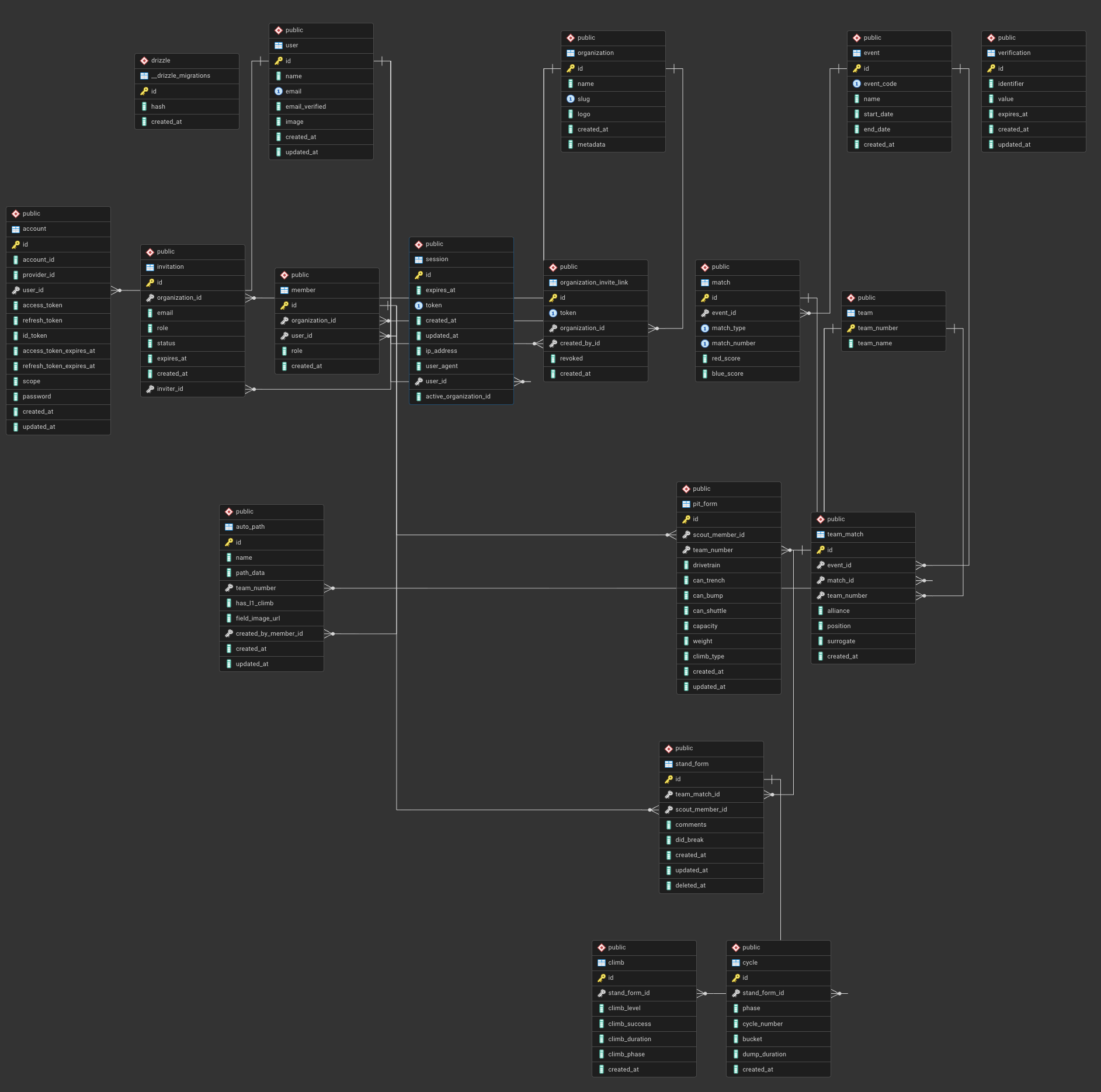
ERD (Entity Relationship Diagram) for the 2026 scouting site
In a relational database, tables are the core building blocks. Each table represents a single kind of thing your application cares about, and each row in that table represents one concrete instance of that thing.
For example, in a scouting application you might have tables for users, events, matches, teams, and scouting forms. Each of these tables stores data about exactly one concept, rather than mixing unrelated information together.
A table is made up of columns and rows. Columns define what attributes are stored (such as team_number, match_number, or created_at), and each row is a single record. This structure is similar to a spreadsheet, but unlike a spreadsheet, tables are designed to be linked together in a consistent and reliable way.
Looking at the ERD above, each box represents a table. The fields listed inside the box are the columns for that table, and the key icon indicates a primary key—usually an id—which uniquely identifies each row. These IDs are what allow other tables to reference a specific record.
For example, instead of storing a team’s name and number everywhere, other tables store a reference like team_number or team_id. A scouting form doesn’t need to duplicate team data; it simply points to the team it belongs to. This keeps the database organized and prevents inconsistencies.
The lines between tables represent relationships. They show how one table references another, such as a match belonging to an event, or a scouting form belonging to a specific team in a specific match. These relationships are what make relational databases powerful, and they allow you to ask meaningful questions like “show me all scouting data for this team at this event” without duplicating information.
As you read the ERD, a good mental model is:
-
Boxes are kinds of data
-
Rows are individual things
-
IDs are how tables point to each other
Understanding tables and how they relate is the foundation for writing useful queries and designing databases that scale beyond simple projects.
Modeling Tables
Designing a database is less about writing SQL and more about deciding how your data should be structured. This process is called modeling, and it’s where most good (or bad) database decisions are made.
When modeling tables, a useful rule of thumb is that each table should represent a single concept. In a scouting app, concepts might include teams, matches, events, users, or scouting entries. If a table starts to describe more than one thing at once, it’s usually a sign that it should be split apart.
A common beginner mistake is to store everything in one large table. While this may seem simpler at first, it quickly becomes difficult to maintain and leads to duplicated or inconsistent data. Relational databases are designed to avoid this by separating data into focused tables and connecting them with relationships.
Another important decision is what belongs in a table versus what should be referenced. Stable, reusable data—like teams, events, or users—should generally live in their own tables. More specific or temporary data—like a team’s performance in a single match—should reference those tables instead of duplicating their information. This is why a scouting form points to a team and a match, rather than storing the team’s name or event details directly.
Primary keys play a central role in modeling. Every table should have a primary key that uniquely identifies each row. Other tables can then store this key as a foreign key to create relationships. These IDs are internal to the database and should be treated as stable identifiers, even if other attributes change over time.
It’s also important to think about how the data will be queried. If you frequently need to answer questions like “show me all matches at this event” or “show me all scouting entries for this team,” your tables should reflect those relationships clearly. Good modeling makes queries straightforward; poor modeling pushes complexity into application code.
Finally, database models evolve. Early versions are rarely perfect, and it’s normal to adjust tables as requirements become clearer. The goal isn’t to predict everything up front, but to build a structure that is logical, consistent, and flexible enough to grow without collapsing under its own complexity.
Modeling tables well is what turns a database from a storage dump into a system you can reason about—and it’s one of the most valuable skills you can learn when building real applications.
What is an ORM?
An ORM (Object–Relational Mapper) is a tool that lets your application interact with a relational database using code, instead of writing raw SQL for every operation.
In a typical web app, your backend is written in a programming language like JavaScript or TypeScript, while your database speaks SQL. An ORM sits between the two and translates database rows into language-native objects, and vice versa. This allows you to work with database data using familiar data structures rather than strings of SQL.
For example, instead of writing a SQL query to fetch a user by ID, an ORM might let you write code that looks like “find this user,” and handle generating the SQL behind the scenes. The result is returned as a regular object your application can work with directly.
One major benefit of an ORM is type safety and structure. Many modern ORMs know the shape of your tables ahead of time and can catch mistakes—like missing fields or invalid relationships—before your code ever runs. This is especially helpful in larger projects where the database schema and application logic are tightly connected.
ORMs also help manage relationships between tables. Rather than manually joining tables and stitching results together, an ORM can follow relationships defined in your schema and return connected data in a more ergonomic way. This makes common operations simpler and less error-prone.
ORMs are not magic. They don’t remove the need to understand how databases work. Poorly written ORM queries can still be slow or inefficient, and there are times when writing raw SQL is clearer or more performant. The best developers use ORMs as a tool, not a crutch.
In our scouting application, we use an ORM (Drizzle) to keep database access consistent, readable, and safer to change over time. Learning how an ORM maps tables to code will make it much easier to build features without constantly context-switching between SQL and application logic.
Drizzle ORM
We use Drizzle as our ORM in the scouting site. Drizzle is a modern ORM designed to feel as close to SQL as possible while still giving you the benefits of working in TypeScript. Instead of hiding the database behind abstractions, Drizzle aims to make database access explicit, predictable, and type-safe.
At its core, Drizzle lets you define your database schema directly in TypeScript. Tables, columns, and relationships are written as code, and Drizzle uses that information to generate strongly typed queries. This means your editor can catch mistakes—like invalid column names or incorrect joins—before the code ever runs.
Unlike some ORMs that try to fully replace SQL, Drizzle embraces it SQL. You still think in terms of tables, joins, and queries, but you write them using a structured API instead of raw strings. If you already understand how relational databases work, Drizzle tends to feel very natural.
Another important feature of Drizzle is that your schema is the source of truth. The same definitions are used for:
-
Database migrations (i.e., schema changes)
-
Query typing
-
Application-level validation
This reduces the risk of your database and backend code drifting out of sync over time.
Drizzle also avoids doing too much “magic.” Queries are predictable, easy to inspect, and closely resemble the SQL they generate. This makes debugging easier and helps reinforce good database habits rather than obscuring them. In the context of an FRC scouting application, Drizzle works well because the data is highly structured and relational. Teams, matches, events, and scouting entries all map cleanly to tables, and Drizzle makes it easier to work with those relationships safely as the application grows.
Drizzle is not a replacement for understanding SQL—it assumes you already care about how your data is modeled. Used correctly, it acts as a bridge between clean database design and maintainable backend code.